Auto Settings
For example, the battery get low, the headphone connection is changed, and so on.
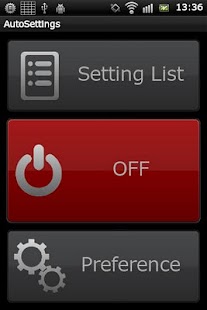
Auto Settings is intended for use in the following situations.* In usually, I want to disable the screen rotation, but when I use a photo apps, I want to enable it.* To make batteries last longer, I want to enable Wifi and GPS, in several apps only.* When viewing web Articles and e-book apps, you want to disable the automatic-screen-off.
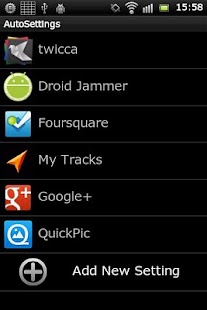
Auto Settings has following features.* You can register the settings and apps which apply new setting.* Auto Settings detect of launching of registered apps, and to apply the setting.* When the Home key is pressed or unregistered app is launched, Auto Settings restore the previous settings.
(*1* When the setting is applied or restored, Auto Settings will show the modified notification by Toast.* When system state is changed.
For example, the battery get low, the headphone connection is changed, setting is applied.
(*1 In Some device, it works by back button.
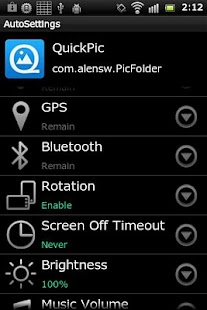
You can change the following settings.・Mobile Data Network (On,Off)
・Wifi (On,Off)
・GPS (*2 (On,Off)
・Bluetooth (On,Off)
・Screen-Rotation (On, Off)
・Screen-Off time (15sec,30sec,1min,2min,10min,30min,Never)
・Screen-Brightness (*3 (Auto,0%,25%,50%,75%,100%)
・Media(Music) Volume ( 0(Mute) to 15(Max) )
(*2 GPS setting should be changed yourself by Android's specific.Auto Settings help to change by opening setting screen.
(*3 "Screen-Brightness" will not take effect immediately.After applying the settings, please turn off screen, then turn on, for taking effect.
System settings is available in Full version.
It will be applied the following cases.* On System Start* Low Battery* Headphone Plugged In / Pulled Out* Power Plugged In / Pulled Out* Screen turned On / Off
* Privacy *Auto Settings access to the recent launched app information for detection of other apps launch.However, Auto Settings does NOT save your log infomation in inside, never.Of course, Auto Settings does NOT send your infomation to the outside, never.(Also, this app does NOT have a permission to communicate with the outside.)
* Thanks *Debug, Feature request - Yuki YamamotoTitle Design - Yuta Oike
About Auto Settings
- Package name (App ID)
- net.tac42.auto_settings
- Available on
- Google Play
- Price
- Free
- Developer
- KF Software House
Looking for the Auto Settings APK?
The safest way to get Auto Settings (net.tac42.auto_settings) on your Android device is to install it directly from Google Play — you'll always get the latest official version, automatic updates, and no risk of modified or infected APK files from third-party sites.
Music Features
Enjoy high-quality music streaming and playback features.
Social Features
Connect and share with friends and the community.
Camera Features
Advanced camera features with editing capabilities.
See Auto Settings in Action
Frequently Asked Questions
Is Auto Settings free?
Yes, Auto Settings is free to download and install on Android through Google Play.
How do I install Auto Settings on Android?
Open Google Play on your Android phone or tablet, search for Auto Settings by KF Software House or tap the Google Play button on this page, then tap Install. The app downloads and installs automatically.
What is net.tac42.auto_settings?
net.tac42.auto_settings is the App ID (package name) of Auto Settings on Google Play. Every Android app has a unique package name, and it is the safest way to verify you are installing the official app.
Is Auto Settings safe to download?
Installing Auto Settings from Google Play is the safest option: you get the official version published by KF Software House, verified by Google Play Protect, with automatic updates. Avoid APK files from unofficial third-party sites.
Get Auto Settings Today
Auto Settings for Android — free download on Google Play.
Compatible with Android phones and tablets — available on Google Play.
Ask AI about this app
Get instant answers about features, tips and more from popular AI assistants.